 PicMason
GIF splitter
Extract every frame of an animated GIF as a full PNG.
Your GIF stays on your device. Your original is unchanged.

Choose a GIF to split
Drop a GIF here or choose a file from your device.
One GIF · 20 MB max · up to 1,000 frames
Up to 4 MP per canvas or patch, 16,384 px per side, and 100 million total canvas pixels and total patch pixels
Selected PNGs: 32 MiB maximum before ZIP packaging
Large GIFs may still exceed your device’s available memory.
From animation to individual images
How to split a GIF into frames
- 01
Open your GIF
Choose a local GIF or use the example. Review its dimensions, frame count and stored delays.
- 02
Choose the frames
Preview the animation and select all frames, a range or every Nth frame.
- 03
Download PNGs
Save an individual full frame or a ZIP containing your selected frames and timing information.
A real, reproducible example
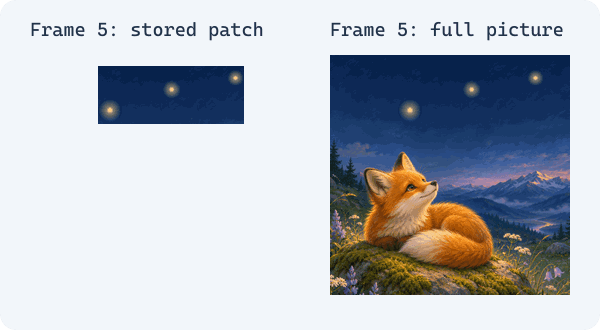
A patch is not always a whole frame
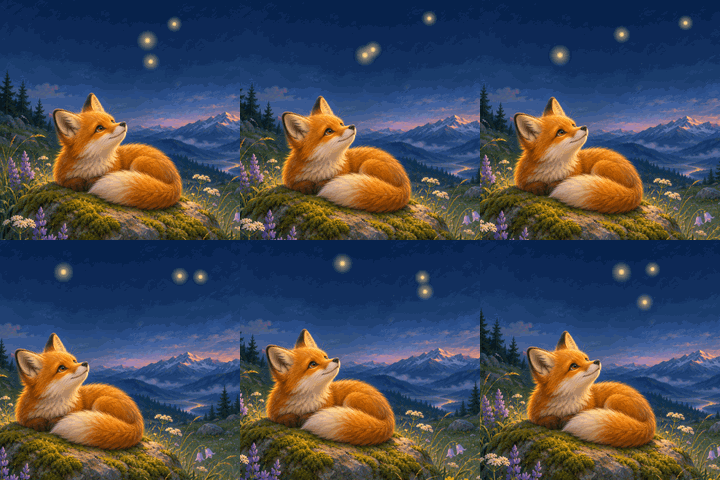
Some GIF frames store only the pixels that changed. The example has 12 frames on a 240 × 240 canvas. The camera gently pans while the fox holds its pose and fireflies move across the sky. Compare a stored patch with its full composited frame.
Timing from the example file
Frame delays and start times
GIF stores delays in hundredths of a second. Start times below add the stored delays; playback in other software may differ.
| Frame | Delay | Start |
|---|---|---|
| 0001 | 100 ms | 0 ms |
| 0002 | 200 ms | 100 ms |
| 0003 | 500 ms | 300 ms |
| 0004 | 100 ms | 800 ms |
| 0005 | 200 ms | 900 ms |
| 0006 | 500 ms | 1100 ms |
| 0007 | 100 ms | 1600 ms |
| 0008 | 200 ms | 1700 ms |
| 0009 | 500 ms | 1900 ms |
| 0010 | 100 ms | 2400 ms |
| 0011 | 200 ms | 2500 ms |
| 0012 | 500 ms | 2700 ms |
Choose frames without losing their order
For example, 1-5,9 selects frames 1 through 5 and frame 9. Selecting every third frame starts at frame 1: 1, 4, 7 and so on. Filenames keep their original frame numbers, so skipped frames are never silently renumbered.
Have a GIF made with ChatGPT? Open the GIF here to pick a still frame or edit individual PNGs with another tool. PicMason does not generate or rebuild the animation. Read about GIF creation from OpenAI.
GIF frame extraction FAQs
Are these complete frames or GIF patches?
Each PNG is the full logical canvas after the GIF patch has been composited. This includes earlier content that remains visible.
Why might the frame count differ from what I see?
A GIF can contain repeated frames or frames with zero delay. The count includes every frame in the file, even when it is difficult to see during playback.
What do delay, start time and loop count mean?
Delay is the value stored in the GIF in milliseconds. Start time is the sum of the preceding stored delays. A loop count of zero means infinite looping; no loop extension is reported as unknown.
Does the export keep transparency?
GIF transparency is binary: each GIF pixel is transparent or opaque. PNG frames preserve that transparency, but do not invent partially transparent edges.
What are the file limits?
Choose one GIF up to 20 MB, 1,000 frames, 4 megapixels per frame or patch, and 16,384 pixels per side. The total canvas pixels and the total decoded patch pixels are each limited to 100 million. Selected PNG data is limited to 32 MiB before ZIP packaging; choose a smaller range if you reach that limit. Large files may still exceed your device's available memory.
Is my GIF uploaded?
No. Reading, compositing and export happen in your browser. The original file is not modified. Exported PNGs do not retain the original file's metadata, including content credentials.
Can I use animated WebP, APNG or video?
This tool accepts GIF87a and GIF89a files only. Animated WebP, APNG and video files are not supported.
Can I export a GIF or sprite sheet?
No. This tool exports PNG frames and a ZIP; it does not rebuild an animation or create a sprite sheet.