 PicMason
Instagram carousel splitter
One image. Connected slides. Preview the swipe, then export.
Images stay on your device. Your original is unchanged.
One panorama. A continuous swipe.
Try our original example: 3 portrait slides, 1080 × 1350 px each.
From one image to a swipe
How to split an image for an Instagram carousel
An Instagram carousel splitter cuts one continuous image into ordered slides. PicMason fits the full banner first, so each neighboring slide meets at the same boundary.
Choose one image
Use a panorama, photo or finished design. Select a local JPEG/MPO, PNG, WebP or HEIC/HEIF still, or try the original example above. The input limit is 20 MB, 50 megapixels and 16,384 px per side.
Fit the complete banner
Choose 2–20 slides and one shape for all of them. Select Crop to fill or Fit with padding, then check each slide in the swipe preview.
Download in order
Generate JPEG or PNG slides. Download the ZIP, unzip it, then select slide 01, 02, 03 and so on in Instagram. Check the crop before sharing.
A real input and its outputs
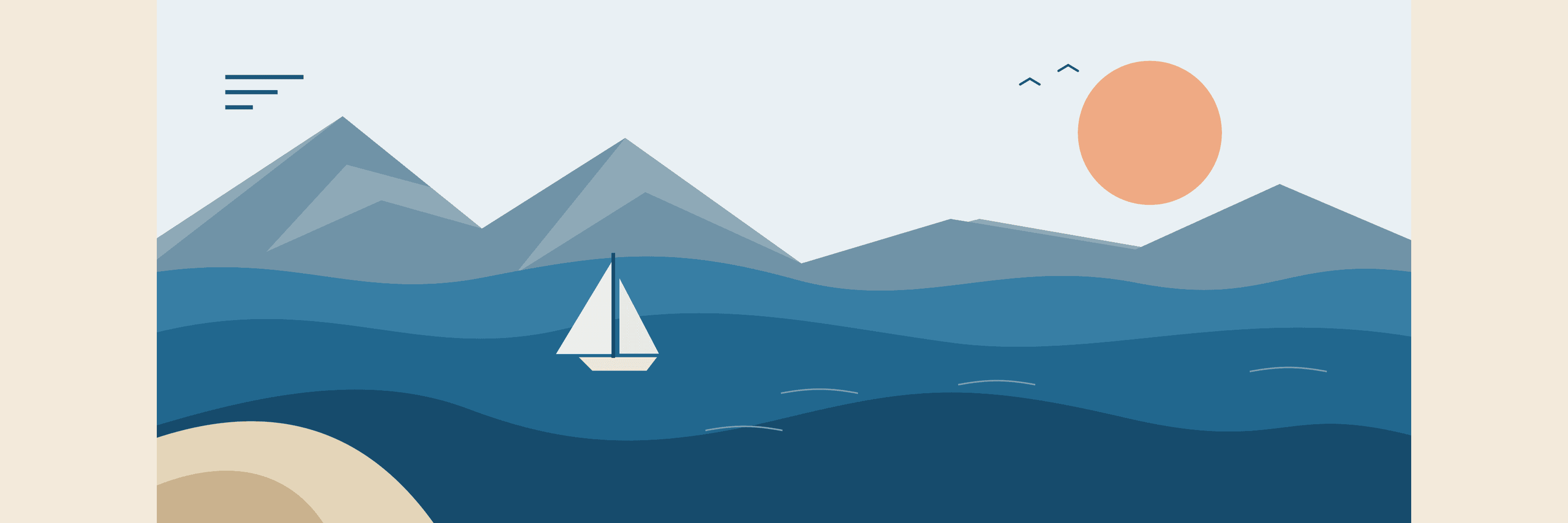
One seascape. Three connected slides.
This original 3240 × 1350 px PNG matches three 4:5 slides exactly. Each output is 1080 × 1350 px. To reproduce these PNG files, choose 3 slides, 4:5 portrait, Crop to fill and PNG. No crop, padding or scaling is needed for this source.





Keep the composition intentional
Crop or pad the banner before splitting
The slide count and shape determine one long canvas. PicMason fits your image to that entire canvas once, then cuts it into slides. It does not independently crop each piece.

Crop to fill
For three square slides, this source loses 135 px at the top and 135 px at the bottom when centered. Adjust the crop position to choose which area stays.
Fit with padding
The whole source is scaled to 2592 × 1080 px. A 324 px background area on each side fills the same three-slide canvas. Nothing in the source is cropped.
Both examples above use the same source, three square slides and a centered image. Other shapes and counts change the fit. Transparent pixels are composited onto your chosen solid background in both JPEG and PNG exports.
Equal dimensions, predictable order
Carousel slide sizes and upload order
PicMason exports every slide at 1080 px wide. Choose one shape for the entire set. A three-slide banner has the combined width shown below; each slide keeps the same height.
| Slide shape | Each slide | Three-slide banner |
|---|---|---|
| Square · 1:1 | 1080 × 1080 px | 3240 × 1080 px |
| Portrait · 4:5 | 1080 × 1350 px | 3240 × 1350 px |
| Tall portrait · 3:4 | 1080 × 1440 px | 3240 × 1440 px |
Select 01 first
The files are numbered from left to right, not in reverse. In Instagram, select all the slides for one carousel in ascending order. Avoid separately zooming or moving individual slides if you want their edges to continue.
Check the final preview
This is a local export tool, not a publishing integration. Your app or publishing service may apply another crop or compression. Check the slide order and framing in that destination before sharing.
Before you export
Instagram carousel splitter FAQs
For connected slides in one post. Your source file stays unchanged.
How do I split an image for an Instagram carousel?
Choose one image, select the number and shape of your slides, then choose Crop to fill or Fit with padding for the complete banner. Check the swipe preview, generate the slides and download the ZIP. Unzip it and select the numbered image files in ascending order when you create your post in Instagram.
How many carousel slides can I make?
PicMason can export 2–20 slides from one image. This is the tool’s export limit, not a guarantee of the number your Instagram app or publishing service accepts. Check your destination before making a long carousel.
What size will my carousel slides be?
Every slide is 1080 pixels wide. Square gives 1080 × 1080 px, 4:5 portrait gives 1080 × 1350 px, and 3:4 portrait gives 1080 × 1440 px. All slides in one export have the same dimensions. These are PicMason output options; check the final crop in your Instagram app before sharing.
Can I split a panorama without cropping it?
Yes. Choose Fit with padding to keep the whole image visible inside the complete banner. PicMason scales the image proportionally and fills the remaining area with your chosen background color. Crop to fill fills the banner by trimming the excess around the image. You can adjust the crop position before exporting.
Does this make an Instagram profile grid?
This tool makes connected slides for one swipeable carousel post. It does not prepare separate profile-grid posts or a reverse publishing sequence. Use the general image splitter if you need rows, columns or an unscaled grid of image pieces.
Can I upload several images, a video or a Live Photo?
Choose one supported still image: JPEG/MPO, PNG, WebP or HEIC/HEIF, up to 20 MB, 50 megapixels and 16,384 pixels on either side. For a Live Photo, only the available still image is used; motion, audio and the paired MOV are not exported here. The tool does not combine several photos or cut a video into slides.
Which export format should I choose?
JPEG offers adjustable compression quality and is a practical choice for photos. PNG keeps the rendered pixels without JPEG compression and can produce larger files. Both exports use your chosen solid background, including behind transparent source pixels. Exports do not retain the original EXIF, GPS, ICC, DPI or HDR metadata.
Will resizing make a small image sharper?
No. The output has the chosen pixel dimensions, but enlarging a small image cannot restore missing detail. Inspect the preview and choose fewer slides if the image would need a large enlargement. Instagram can also resize or recompress images after upload.
Is it free, and does PicMason publish the post?
The tool is free and runs in your browser without an account. Your image is not uploaded to PicMason. Download the slide files and create the post yourself in Instagram; PicMason does not connect to your Instagram account or publish automatically.
Posting reference: Instagram’s carousel publishing guide and photo resolution help. Instagram is a trademark of its owner; PicMason is an independent tool.
By the PicMason team · Updated .